THE MENU PAGE
Login or Sign Up
When you go to our online ordering site, you have two options:
Log In to your existing account or Sign Up to create a new account.
Account Information
Login or Create a new account
This is our main Login page on the HungerRush ordering system.
When you visit https://bugsys.hungerrush.com/ and click Log In, this is the page you will see.
From here you can:
- Log In if you already have an account, or
- Sign Up to create a new account.
Note: If you click Sign Up directly from the menu page, it will take you straight to the new account creation page.
If you are already registered, scroll down to the “I Have An Account” section below for login help.

Sign Up
Create a New Account
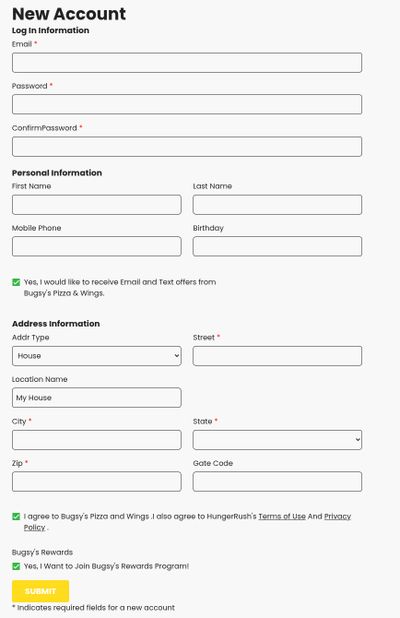
This is where you create your new account on our HungerRush online ordering system.
Please complete the form below.
Key checkboxes to watch for:
- ✓ Yes, I would like to receive Email and Text offers from Bugsy’s Pizza & Wings – Check this box to receive our text and email offers.
- ✓ Yes, I Want to Join Bugsy’s Rewards Program! – Check this if you’d like to join our rewards program.
After filling out all required fields, click the yellow SUBMIT button.
I have an account
After you log in
Click on the My Account link
My Account
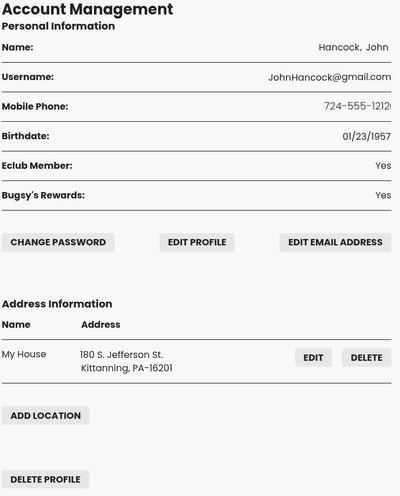
Account Management
This is your Account Management page where you can view and update your information.
Here you can:
- Verify your personal details
- Make changes using the available buttons:
- EDIT PROFILE – Update your information and manage your Rewards & Offers preferences
- EDIT EMAIL ADDRESS
- CHANGE PASSWORD
- Edit your delivery address or add new locations to make ordering faster and easier
Edit Profile
Personal Information
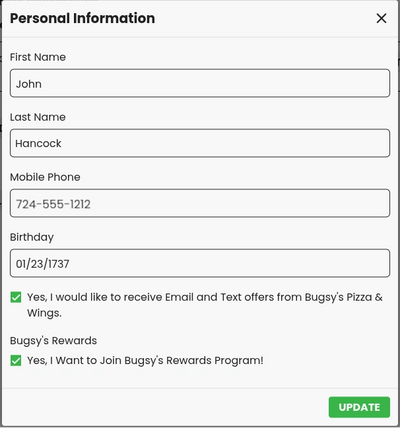
On the Personal Information page, you can review and update your details.
Please make sure all your information is correct, especially your mobile phone number.
Most importantly, check the boxes if you want to receive our Email and Text offers and to join Bugsy’s Rewards Program.
- ✓ Yes, I would like to receive Email and Text offers from Bugsy’s Pizza & Wings.
- ✓ Yes, I Want to Join Bugsy’s Rewards Program!
Click the green UPDATE button when you are finished making changes.